Projects
Automating TLS Syslog Forwarding from a Proxmox Cluster to Cribl Cloud with Ansible and Semaphore
Standing up agentless, non-root log forwarding across a 3-node Proxmox cluster using Ansible, Semaphore UI, and a private GitHub repo – then chasing down a Cribl Cloud port restriction that quietly blocked the whole pipeline.
Syncing Withings to Garmin Connect with Docker on Unraid
Automated sync from a Withings scale to Garmin Connect using withings-sync running as a self-contained Docker container on Unraid. The container handles its own scheduling via supercronic — no host-level cron required.
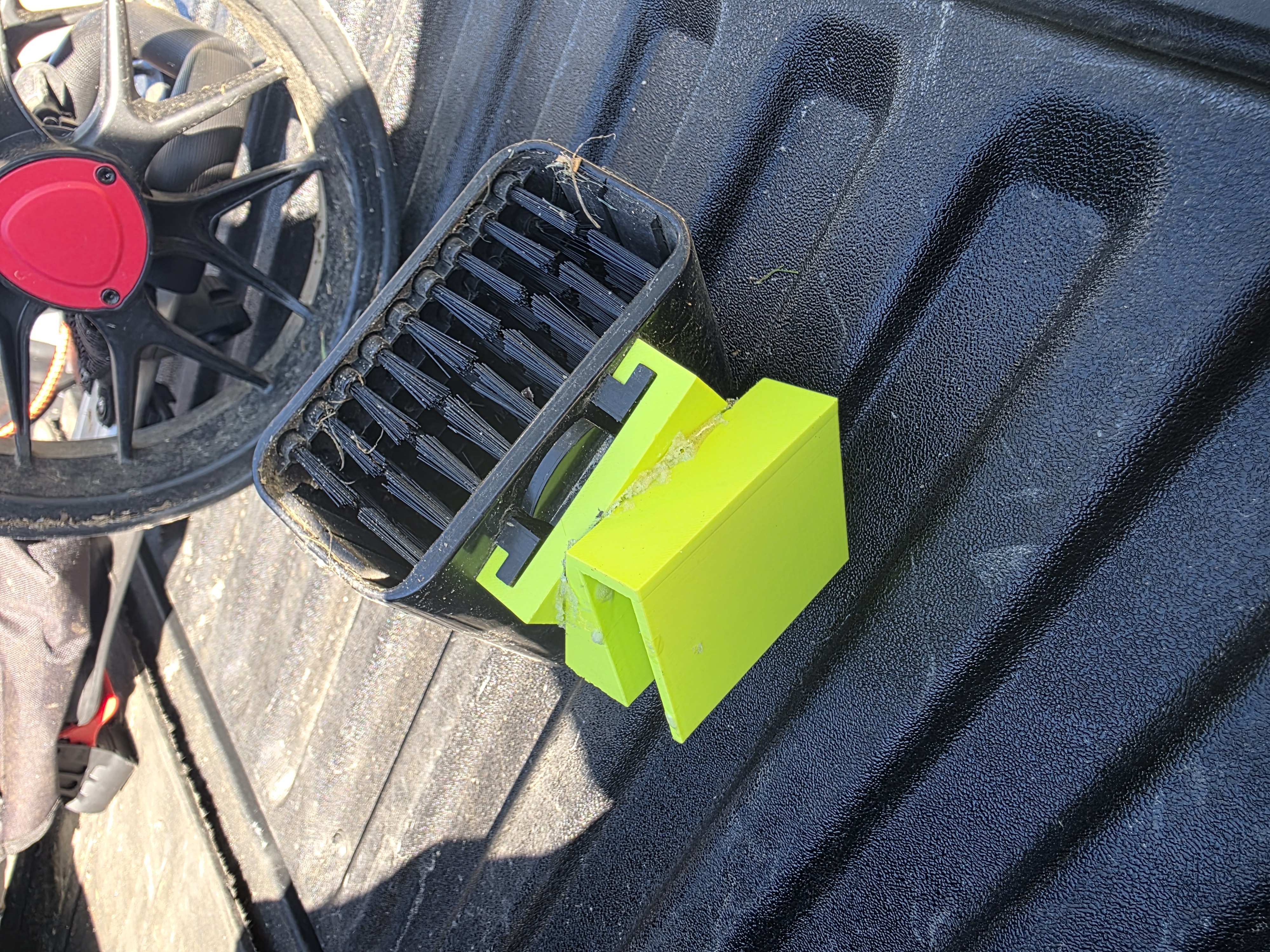
3D Printed Club Cleaner Mount for Push Cart
The Problem Keeping clubs clean mid-round makes a real difference – dirt and grass packed into the grooves kills spin and control. Motorized golf carts have had side-mounted ball and club cleaners for years, and Scrubi has a solid solution for push carts too. Catch is, their mount is designed specifically for clip-gear-style carts, and my CaddyLite push cart doesn’t have that interface.
The style of integrated club cleaner common on motorized golf carts – the inspiration for this build.
Browser Patching at Scale with CrowdStrike Falcon for IT
Browser vulnerabilities have quietly become one of the most reliable entry points for attackers. As browsers have grown into full application runtimes — executing JavaScript, handling credentials, processing untrusted content from every corner of the internet — the attack surface they expose has grown with them. High-severity CVEs targeting Chromium, Firefox, and Edge are now a near-monthly occurrence, and the window between public disclosure and active exploitation has shrunk considerably.
Deploying the CrowdStrike AIDR Browser Extension via Falcon for IT
Using Falcon for IT to deploy the CrowdStrike AIDR browser collector across Edge, Chrome, and Firefox Developer Edition — writing browser policies directly on endpoints via the Falcon sensor without standing up a parallel MDM deployment.
Learning CrowdStrike CQL: Threat Hunting in Falcon NG-SIEM
Tracking a simulated multi-stage intrusion from initial access through ransomware deployment using CrowdStrike Query Language (CQL) in Falcon’s Advanced Event Search.
Enriching SIEM Alerts with RunZero Asset Data via Cribl
Polling the RunZero REST API hourly with Cribl to stream asset inventory into a SIEM, giving an MSSP the context needed to triage alerts accurately.
Homelab Uptime Monitoring with Uptime Kuma and Telegram Alerts
Push-based heartbeat monitoring for homelab servers hosted on an external platform, with Telegram notifications for down and recovery events.
Proxmox Backup Failure Notifications with Gotify and PikaPods
Proxmox has a built-in notification system, but by default it only routes alerts to a local email address. I wanted backup failure alerts delivered to my phone as push notifications – without relying on email. This post covers how I set that up using Gotify hosted on PikaPods, wired into Proxmox’s notification targets and matchers.
Proxmox Backup Server: VM-Based PBS with Unraid NFS and Offsite Sync
For a while, my Proxmox Backup Server (PBS) ran on a dedicated bare-metal machine – reliable, but one more box humming away on the shelf. As part of a broader effort to consolidate my homelab, I decided to move PBS into a VM on one of my existing Proxmox nodes. The catch: I still wanted my local Unraid NAS to serve as the primary backup datastore, which isn’t something PBS supports out of the box. And on top of that, I wanted a second copy synced offsite to a second Unraid server at a different location for a proper offsite backup tier.
This post covers how I pulled all of that off – from the VM setup, through the NFS datastore configuration, to the offsite sync job running automatically.
Fixing DNS Telemetry with Packetbeat and Cribl
Most of my servers send logs to CrowdStrike NG-SIEM through Cribl Edge, which handles Windows Event and Security logs just fine. DNS was the exception and it needed a totally different approach.
The problem with Windows DNS flat-file logs Windows DNS Server writes queries to a flat text file. Getting those into a SIEM means either tailing the file with a log shipper or enabling analytic event logging, and both options have real limitations.
Word to Hugo Blog Workflow
Purpose The purpose of this guide is to make your blog publishing workflow simpler:
write in Word as usual export the document to Markdown keep images with the post using a Hugo page bundle avoid manual renaming or relinking of images Step-by-step workflow 1. Create a new post folder In your Hugo site, create a new folder for the post under content/blog/.
1mkdir -p content/blog/my-word-post 2. Save your Word file as .docx Save the Word document from Microsoft Word as a .docx file. For example:
Forwarding Fortinet Firewall Logs to Cribl Cloud via TLS Syslog
Bridging an out-of-band firewall into a cloud-native observability pipeline without touching the internal network.
The Applications of 3D Printing in Theatre and Entertainment
Bachelor of Arts in Theatre Design and Technology — Capstone Research Project, University of New Hampshire, Fall 2021 / Spring 2022. Faculty Advisor: Szu-Feng Chen.