Browser Patching at Scale with CrowdStrike Falcon for IT
Browser vulnerabilities have quietly become one of the most reliable entry points for attackers. As browsers have grown into full application runtimes — executing JavaScript, handling credentials, processing untrusted content from every corner of the internet — the attack surface they expose has grown with them. High-severity CVEs targeting Chromium, Firefox, and Edge are now a near-monthly occurrence, and the window between public disclosure and active exploitation has shrunk considerably.
For most environments, the challenge isn’t knowing that browsers need patching — it’s doing it consistently, quickly, and without disrupting users. That’s what this post covers: a lightweight approach using CrowdStrike Falcon for IT and winget to push silent browser updates across a Windows fleet, with minimal overhead and no user interaction required.
Why browsers specifically?
Patch management tooling tends to focus heavily on OS-level updates. Browsers often fall into a gap — they update themselves when the user restarts them, which means unpatched versions can persist for days or weeks on machines where users never fully close their browser.
From a risk management perspective this matters because:
- Browser CVEs are frequently weaponised quickly after disclosure, particularly in Chromium-based browsers where the patch diff is public.
- Many users run browsers with saved credentials, active sessions, and access to internal web apps — making a compromised browser session a high-value target.
- Self-update mechanisms are unreliable in managed environments where users lack admin rights or where the browser update service has been disabled by policy.
Enforcing updates centrally, on a schedule you control, closes that gap.
The tooling
winget
Windows Package Manager (winget) is Microsoft’s native CLI package manager, available on Windows 10 1809 and later. For browser patching it’s ideal because:
- It uses official package IDs mapped to vendor-distributed binaries — no third-party repackaging.
winget upgrade --idwill only upgrade an existing installation — it will never install a package that isn’t already present on the machine.- The
--silentflag suppresses all UI, and--accept-source-agreements/--accept-package-agreementshandle any prompts automatically.
Falcon for IT
CrowdStrike Falcon for IT provides real-time script execution across your fleet via the Falcon sensor. Scripts run in the SYSTEM context in the background — no visible window, no UAC prompt, nothing surfaced to the end user. Combined with winget’s silent flags, the entire update process is invisible to whoever is sitting at the machine.
Falcon for IT also allows you to scope execution by host group, OS version, or any other asset attribute — so you can target only Windows machines and avoid pushing winget commands to Mac or Linux assets where it wouldn’t apply.
The scripts
Each browser gets its own saved script in Falcon for IT, targeting both the application package and the installer package where applicable. This covers scenarios where the browser was deployed via the installer variant rather than the main package.
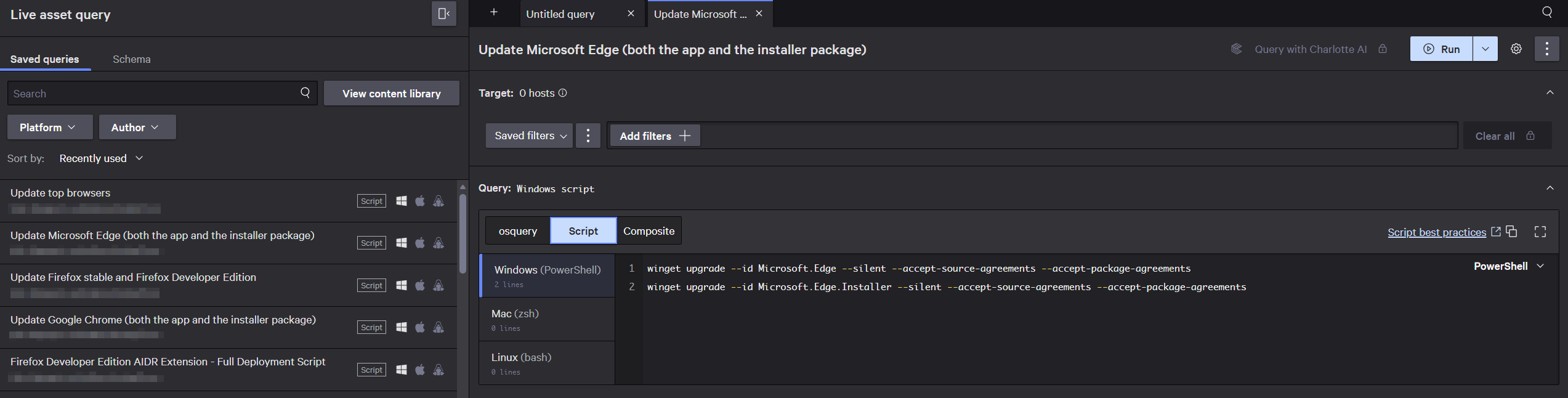
Individual browser scripts saved in Falcon for IT. Each targets both the app and installer package IDs.
Individual browser scripts
Google Chrome
1winget upgrade --id Google.Chrome --silent --accept-source-agreements --accept-package-agreements
2winget upgrade --id Google.Chrome.EXE --silent --accept-source-agreements --accept-package-agreements
Mozilla Firefox (stable + Developer Edition)
1winget upgrade --id Mozilla.Firefox --silent --accept-source-agreements --accept-package-agreements
2winget upgrade --id Mozilla.Firefox.DeveloperEdition --silent --accept-source-agreements --accept-package-agreements
Microsoft Edge
1winget upgrade --id Microsoft.Edge --silent --accept-source-agreements --accept-package-agreements
2winget upgrade --id Microsoft.Edge.Installer --silent --accept-source-agreements --accept-package-agreements
All browsers — combined fleet script
For a full fleet sweep, a single combined script covers every browser present in the environment. The script checks whether each package is actually installed before attempting an upgrade — keeping the Falcon execution logs clean and ensuring winget never attempts to install something that isn’t there.
 1# Resolve winget path in SYSTEM context
 2$wingetCmd = Get-Command winget -ErrorAction SilentlyContinue
 3if ($wingetCmd) {
 4    $winget = $wingetCmd.Source
 5} else {
 6    $winget = Get-ChildItem "C:\Program Files\WindowsApps\Microsoft.DesktopAppInstaller_*" -Filter "winget.exe" -Recurse -ErrorAction SilentlyContinue |
 7              Sort-Object LastWriteTime -Descending |
 8              Select-Object -First 1 -ExpandProperty FullName
 9}
10
11if (-not $winget) {
12    Write-Output "winget not found on this machine. Exiting."
13    exit 1
14}
15
16$browsers = @(
17    "Google.Chrome",
18    "Google.Chrome.EXE",
19    "Mozilla.Firefox",
20    "Mozilla.Firefox.DeveloperEdition",
21    "Microsoft.Edge",
22    "Microsoft.Edge.Installer",
23    "Brave.Brave",
24    "Opera.Opera",
25    "DuckDuckGo.DesktopBrowser"
26)
27
28foreach ($id in $browsers) {
29    $installed = & $winget list --id $id --accept-source-agreements 2>&1
30    if ($installed -match $id) {
31        Write-Output "Upgrading $id..."
32        & $winget upgrade --id $id --silent --accept-source-agreements --accept-package-agreements
33    } else {
34        Write-Output "$id not installed, skipping."
35    }
36}
The script opens by resolving the winget executable path explicitly — necessary because Falcon for IT runs as SYSTEM, which doesn’t have the same PATH as an interactive user session. If Get-Command doesn’t find it, the script falls back to searching the WindowsApps directory directly. If winget still can’t be found, it exits cleanly rather than failing silently.
The Write-Output lines feed into Falcon’s execution log, giving you a clear per-machine record of what was found, what was upgraded, and what was skipped — useful for audit trails and for spotting machines that have unexpected browsers installed.
Behaviour notes
Open browsers at update time
If Chrome or Edge is open when the script runs, winget will download and stage the update silently but the replacement won’t complete until the browser restarts. The user won’t see anything, but the new version won’t be active until their next launch. Firefox handles in-place replacement slightly differently and may briefly flash a progress indicator depending on the version.
Packages not installed
As noted above, winget upgrade --id is upgrade-only. If the package isn’t present on a machine, winget exits cleanly with No installed package found matching input criteria and moves on. The existence check in the combined script makes this explicit in the logs rather than relying on winget’s exit behaviour.
Safari and Internet Explorer
The environment includes Mac assets which account for Safari appearing in browser telemetry. Since winget is Windows-only, Safari is out of scope here. Internet Explorer is a Windows component managed through Windows Update rather than a standalone package — it can’t be targeted via winget and has been end-of-life since 2022.
What’s next — Falcon Fusion SOAR
Right now these scripts are run manually or on a schedule via Falcon for IT. The natural next step is connecting this to Falcon Fusion SOAR to trigger browser patch runs automatically in response to intelligence signals — for example, kicking off a targeted Chrome update across the fleet when a new high-severity Chromium CVE is published, without waiting for the next scheduled maintenance window.
That closes the remaining gap between disclosure and remediation, which is increasingly where the risk sits. More on that when the automation is built out.