Fixing DNS Telemetry with Packetbeat and Cribl
Most of my servers send logs to CrowdStrike NG-SIEM through Cribl Edge, which handles Windows Event and Security logs just fine. DNS was the exception and it needed a totally different approach.
The problem with Windows DNS flat-file logs
Windows DNS Server writes queries to a flat text file. Getting those into a SIEM means either tailing the file with a log shipper or enabling analytic event logging, and both options have real limitations.
Flat-file parsing is brittle and drops structured fields like query type, response code, and answer data. Enabling Windows DNS debug logging cranks up event volume and tanks performance, with inconsistent formatting on top of that. The end result is DNS records that are noisy, incomplete, and painful to use during an investigation.
This wasn’t just a home lab annoyance – I was running into the same thing at work. Incomplete DNS telemetry was slowing down security investigations and making it hard to correlate lateral movement or C2 beaconing against DNS queries.
Enter Packetbeat
A tip in the Cribl community Slack pointed me toward Packetbeat, an Elastic Beat that does passive packet capture at the network interface level. It’s the same approach the old Splunk Stream agent used to take. Instead of parsing log files after the fact, Packetbeat intercepts DNS packets at port 53 and structures every query and response into a rich JSON event.
Every DNS event includes the question name, record type, response code, all answer records (including authority and additional sections), TTL, and timing. No parsing, no missing fields. The YAML config is simple and it deploys as a Windows service.
How it’s wired up in Cribl
The flow looks like this:
DNS Server (:53) -> Packetbeat (pcap) -> Cribl Stream (Elastic API :9200) -> CrowdStrike NG-SIEM
On the Cribl Stream side there are two pieces: an Elasticsearch API source (in_elastic) that receives events from Packetbeat on port 9200, and a CrowdStrike Falcon Next-Gen SIEM destination that forwards them along in JSON format.
On the CrowdStrike side, the connection is set up using the Cribl Data Connector with the microsoft-windows-dns parser selected and host enrichment enabled. This means NG-SIEM knows how to interpret the incoming events right out of the box.
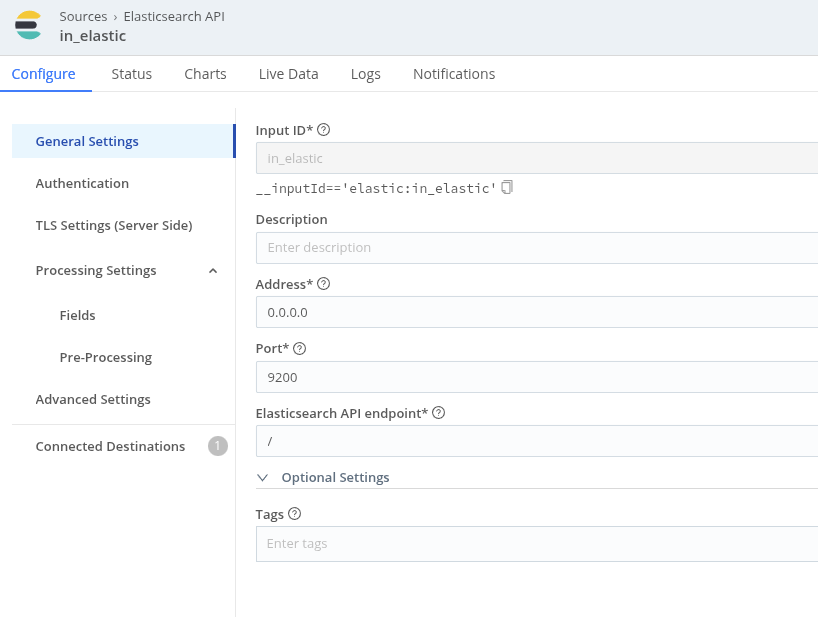
Elasticsearch API source (in_elastic) – port 9200, listens on 0.0.0.0
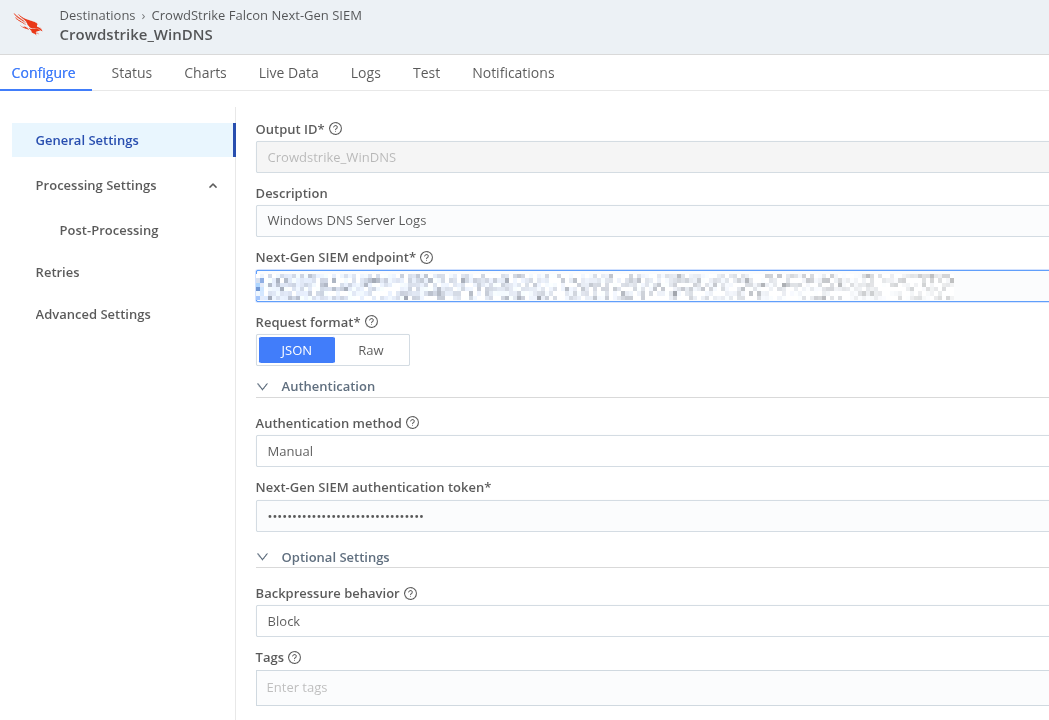
CrowdStrike NG-SIEM destination – JSON format, manual auth token
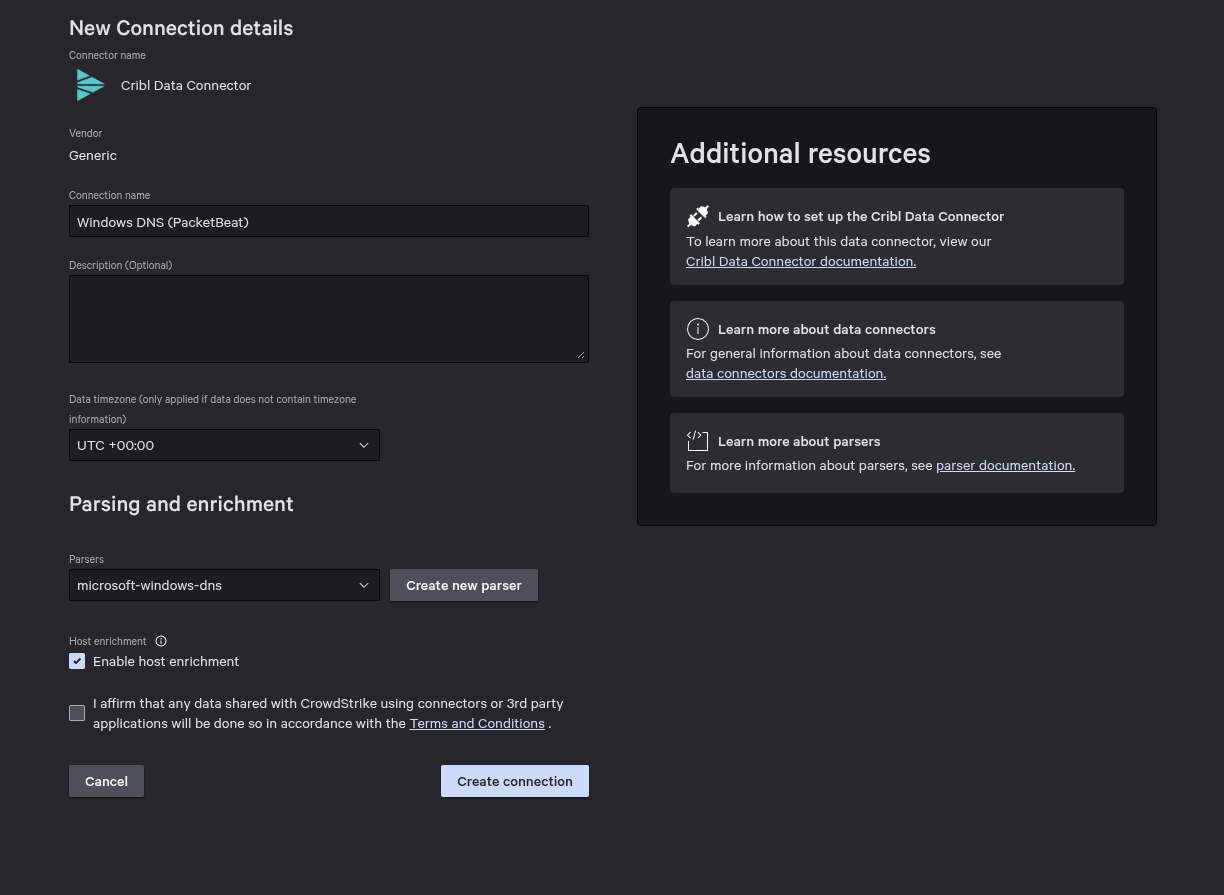
CrowdStrike Data Connector – Windows DNS (PacketBeat) with microsoft-windows-dns parser
The Packetbeat config
A few things worth calling out: auto_promisc_mode: true handles interface setup automatically, include_authorities and include_additionals give you the full DNS response picture, and the drop_event processor block knocks out the three biggest sources of noise – WPAD probes, mDNS, and reverse PTR lookups. The output points at the Cribl Stream Elasticsearch API endpoint on port 9200.
 1# ============ Interfaces ============
 2packetbeat.interfaces:
 3  device: 0
 4  type: pcap
 5  auto_promisc_mode: true
 6  buffer_size_mb: 100
 7
 8# ============ Protocols ============
 9packetbeat.protocols:
10- type: dns
11  ports: [53]
12  include_authorities: true
13  include_additionals: true
14  send_request: true
15  send_response: true
16
17# ============ Noise filters ============
18processors:
19  - add_host_metadata: {}
20  - add_cloud_metadata: {}
21  - drop_event:
22      when:
23        or:
24          - equals:
25              dns.question.name: "wpad"
26          - contains:
27              dns.question.name: ".local"
28          - regexp:
29              dns.question.name: ".*\\.arpa$"
30
31# ============ Output to Cribl Stream ============
32output.elasticsearch:
33  hosts: ["https://<cribl-stream-host>:9200"]
34  ssl.enabled: true
35
36# ============ General ============
37name: dns-server-packetbeat
38tags: ["dns", "windows-dns", "packetbeat"]
39fields:
40  environment: production
41  role: dns-server
42fields_under_root: true
43
44# ============ Performance ============
45queue.mem:
46  events: 4096
47  flush.min_events: 512
48  flush.timeout: 1s
What this actually achieves
With structured DNS telemetry flowing through Cribl Stream and into CrowdStrike NG-SIEM, I can now write detections against DNS response codes, query types, and answer records instead of trying to regex-parse flat log lines. Pivoting from an alert to full DNS context during an investigation went from painful to instant.
The noise filtering in the processor block was important – dropping WPAD, mDNS, and PTR lookups cut event volume noticeably without losing anything security-relevant. Cribl handles any further enrichment before events land in the SIEM.
This setup solves a problem I was also dealing with at work – DNS telemetry gaps are a common blind spot in Windows-heavy environments. If you’re running Cribl and have Windows DNS servers, Packetbeat is worth the 20-minute config.