Automating TLS Syslog Forwarding from a Proxmox Cluster to Cribl Cloud with Ansible and Semaphore
Standing up agentless, non-root log forwarding across a 3-node Proxmox cluster using Ansible, Semaphore UI, and a private GitHub repo – then chasing down a Cribl Cloud port restriction that quietly blocked the whole pipeline.
Architecture Overview
+---------------------+      +---------------------+      +---------------------+      +---------------------+
|                     |      |                     |      |                     |      |                     |
|   GitHub            |      |   Semaphore UI      |      |   Proxmox Cluster   |      |   Cribl Cloud       |
|   (private repo)    | ---> |   (control node,    | ---> |   pve0 / pve1/ pve2 | ---> |   Syslog TLS        |
|   playbook + vars   |      |   runs as CT 113)   |      |   rsyslog + TLS     |      |   Source            |
|                     |      |                     |      |                     |      |                     |
+---------------------+      +---------------------+      +---------------------+      +---------------------+
Background
I wanted my 3-node Proxmox cluster shipping its system logs off-box to Cribl Cloud, same as the Fortinet firewall I already had forwarding there. Doing it by hand on three nodes felt tedious and hard to reproduce, and a one-off script felt like the kind of thing I’d regret the first time I needed to change a hostname or a port. So instead I wrote a small, version-controlled Ansible playbook, triggered from a Semaphore instance I already run as a container on the cluster, authenticating as a dedicated non-root service account instead of SSHing in as root.
Semaphore isn’t competing with Ansible – it’s an open-source, self-hosted web UI that sits on top of it (and Terraform/OpenTofu, if you use those too). It gives me a browser to trigger playbooks, manage inventories and secrets, and watch run output live, instead of doing all of that from a terminal.
Implementation
01 – Confirm the cluster topology
The cluster (ProxmoxXr700) has three nodes – pve0, pve1, pve2 – each running its own mix of containers and VMs, with Semaphore itself living as an unprivileged container (CT 113) directly on pve0.
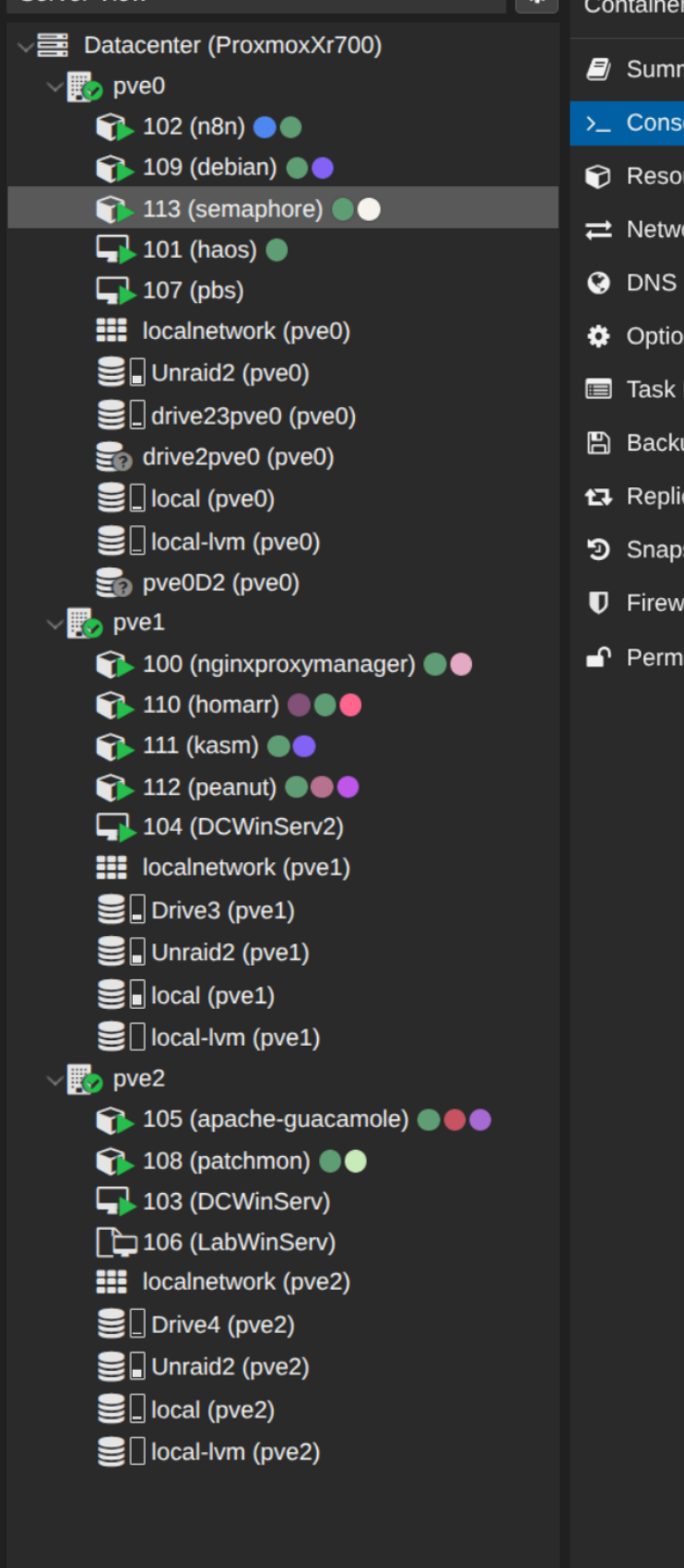
Datacenter tree – pve0, pve1, pve2, with the Semaphore container (CT 113) on pve0
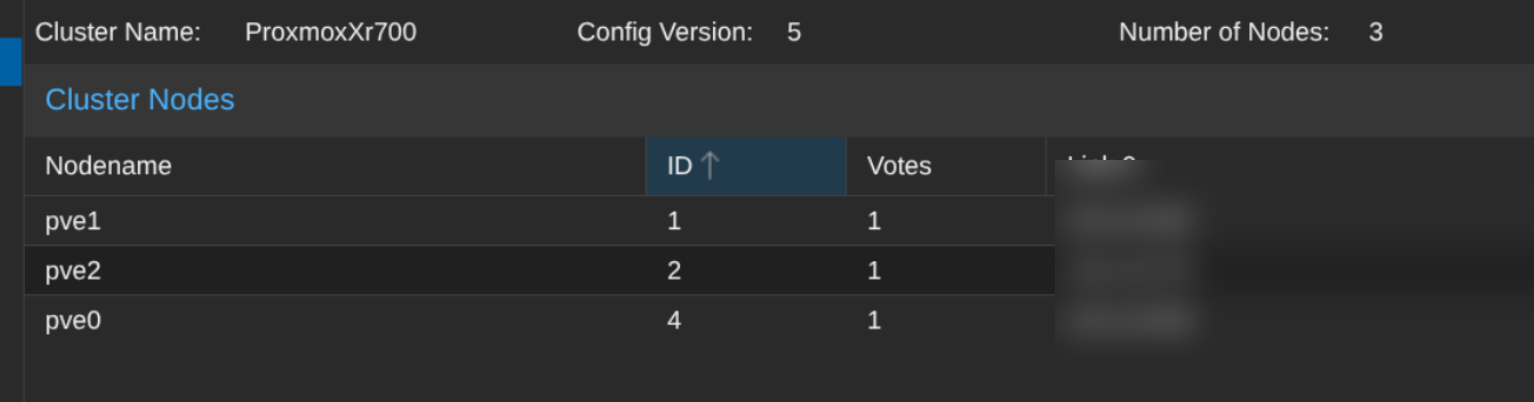
Cluster Nodes – three-node quorum, one vote per node
02 – Create a dedicated, non-root automation account
Rather than have Semaphore authenticate as root on every node, I created a dedicated ansible user on all three Proxmox hosts, with:
- An SSH keypair generated specifically for this automation (
ansible_semaphore_key), no passphrase, used only by Semaphore - The public key dropped into
~/.ssh/authorized_keysfor theansibleuser - Passwordless
sudoscoped to that one account via/etc/sudoers.d/ansible - Root SSH login left enabled short-term for the bootstrap – I planned to disable it (
PermitRootLogin no) once the new account checked out on all three nodes
This is a one-time manual step on each node – Ansible can’t be used to create the very account Ansible will later authenticate as.
03 – Write the playbook and push it to a private GitHub repo
Semaphore pulls its playbooks from a Git repo rather than accepting ad-hoc uploads, so I pushed the project structure to a new private repo:
proxmox-syslog/
├── inventory.ini
├── syslog-forward.yml
└── templates/
    └── 50-remote.conf.j2
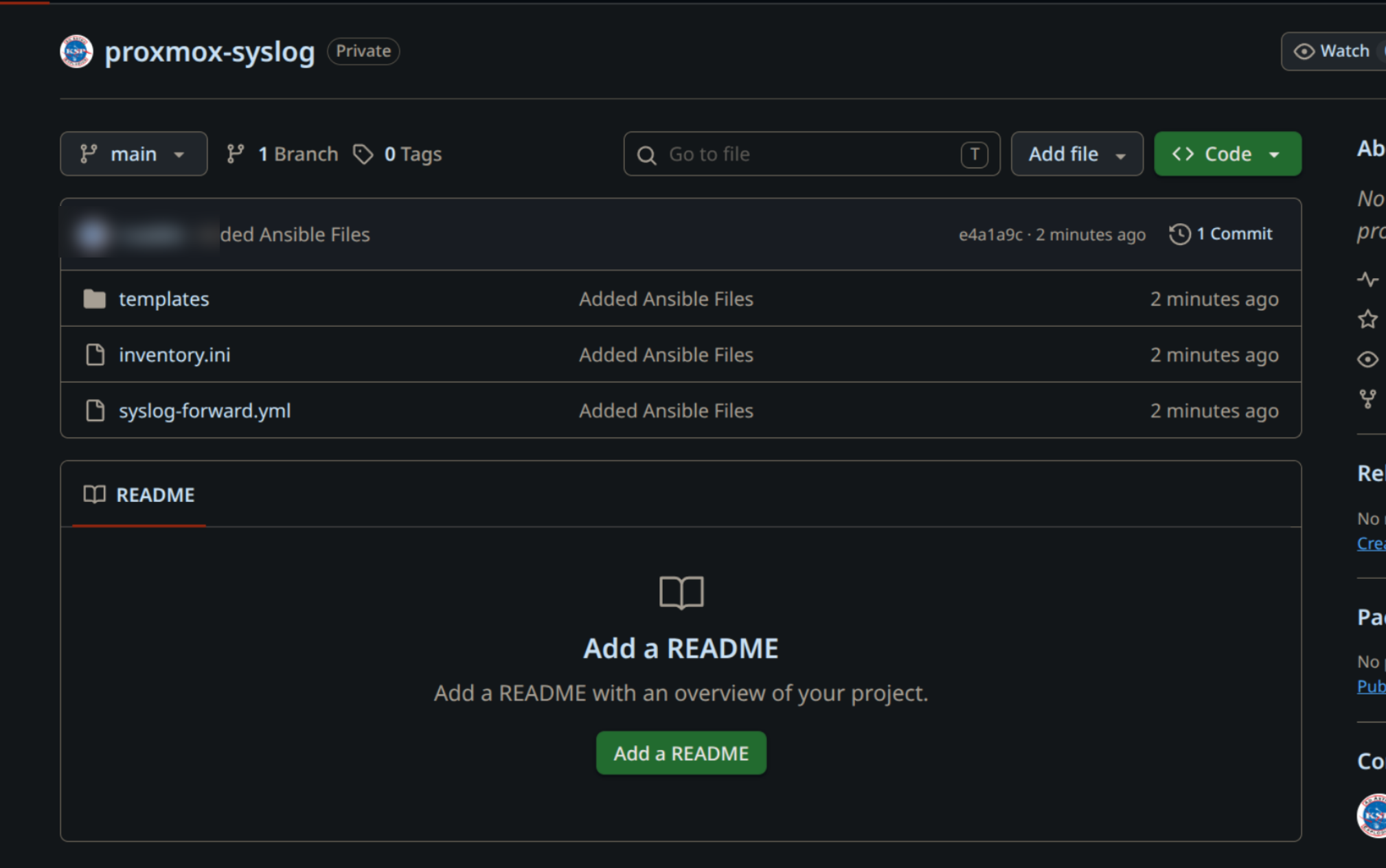
The private repo Semaphore pulls the playbook, inventory, and rsyslog template from
The inventory targets the three nodes by their internal IPs, authenticating as the new ansible user:
1[proxmox_nodes]
2pve0 ansible_host=10.0.10.88
3pve1 ansible_host=10.0.10.85
4pve2 ansible_host=10.0.10.78
5
6[proxmox_nodes:vars]
7ansible_user=ansible
8ansible_become=true
The playbook installs the required packages, deploys a templated rsyslog config, and validates it before restarting the service – deliberately using rsyslogd -N1 as a syntax-check gate so a bad config can’t take down logging across the whole cluster in one run:
 1---
 2- name: Configure TLS syslog forwarding to Cribl Cloud
 3  hosts: proxmox_nodes
 4  become: true
 5
 6  tasks:
 7    - name: Ensure ca-certificates is installed
 8      ansible.builtin.apt:
 9        name: ca-certificates
10        state: present
11        update_cache: true
12
13    - name: Ensure rsyslog and TLS support are installed
14      ansible.builtin.apt:
15        name:
16          - rsyslog
17          - rsyslog-gnutls
18        state: present
19
20    - name: Ensure rsyslog service is enabled and running
21      ansible.builtin.service:
22        name: rsyslog
23        state: started
24        enabled: true
25
26    - name: Deploy rsyslog TLS forwarding config
27      ansible.builtin.template:
28        src: templates/50-remote.conf.j2
29        dest: /etc/rsyslog.d/50-remote.conf
30        owner: root
31        group: root
32        mode: '0644'
33      notify: restart rsyslog
34
35    - name: Validate rsyslog config before relying on it
36      ansible.builtin.command: rsyslogd -N1
37      register: rsyslog_check
38      changed_when: false
39      failed_when: rsyslog_check.rc != 0
40
41  handlers:
42    - name: restart rsyslog
43      ansible.builtin.service:
44        name: rsyslog
45        state: restarted
The rsyslog TLS action template, with the destination parameterized rather than hardcoded:
global(
    DefaultNetstreamDriver="gtls"
    DefaultNetstreamDriverCAFile="/etc/ssl/certs/ca-certificates.crt"
)

action(
    type="omfwd"
    target="{{ syslog_server }}"
    port="{{ syslog_port }}"
    protocol="tcp"
    StreamDriver="gtls"
    StreamDriverMode="1"
    StreamDriverAuthMode="x509/name"
    action.resumeRetryCount="-1"
)
04 – Wire it up in Semaphore
Inside a new Semaphore project, I wired the pieces together: a Key Store entry for the ansible user’s private key (kept separate from a second, read-only GitHub deploy key used only to clone the repo), a File-type inventory pointed at inventory.ini, a Variable Group holding the Cribl destination as extra vars, and a Task Template tying the playbook, inventory, repo, and variables together.
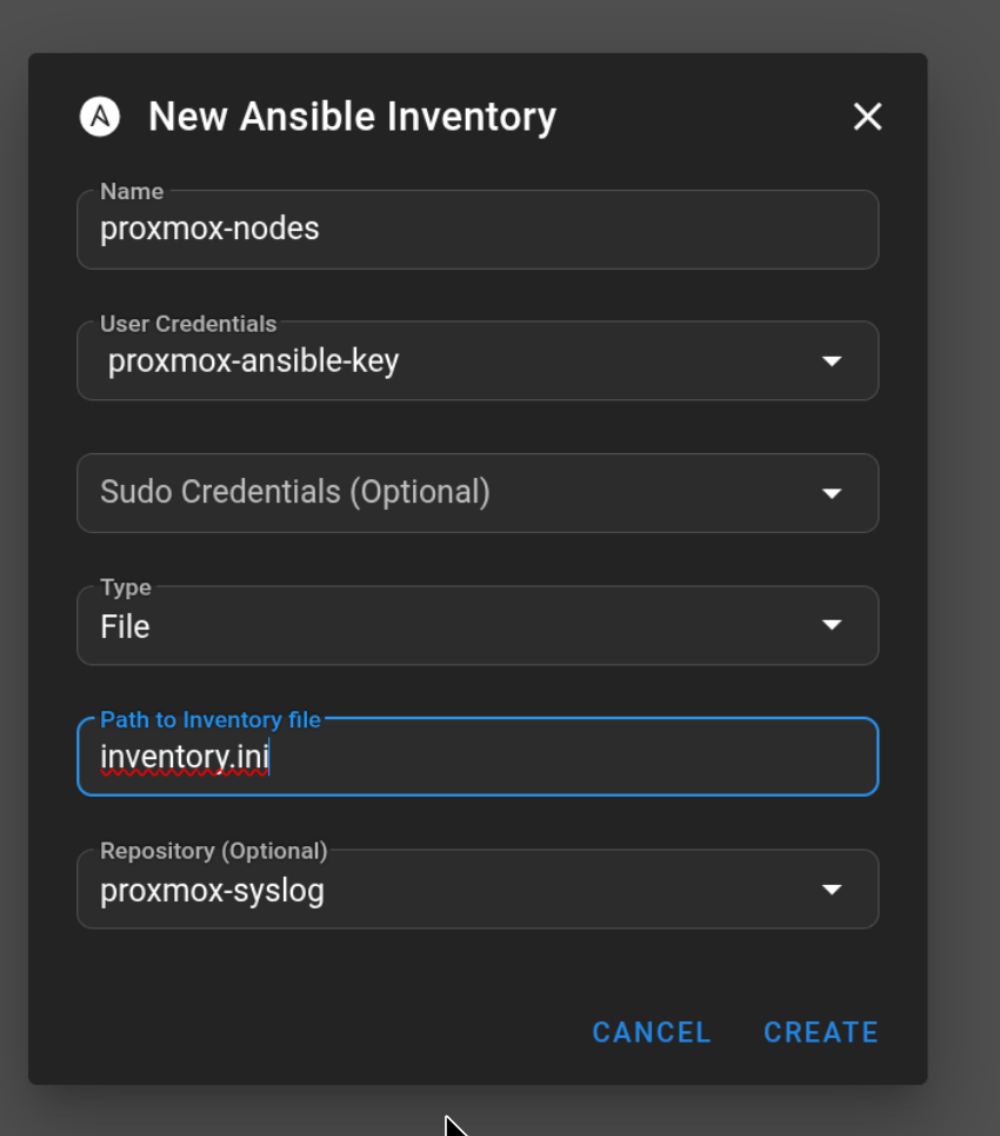
Semaphore inventory – File type, backed by inventory.ini in the private repo
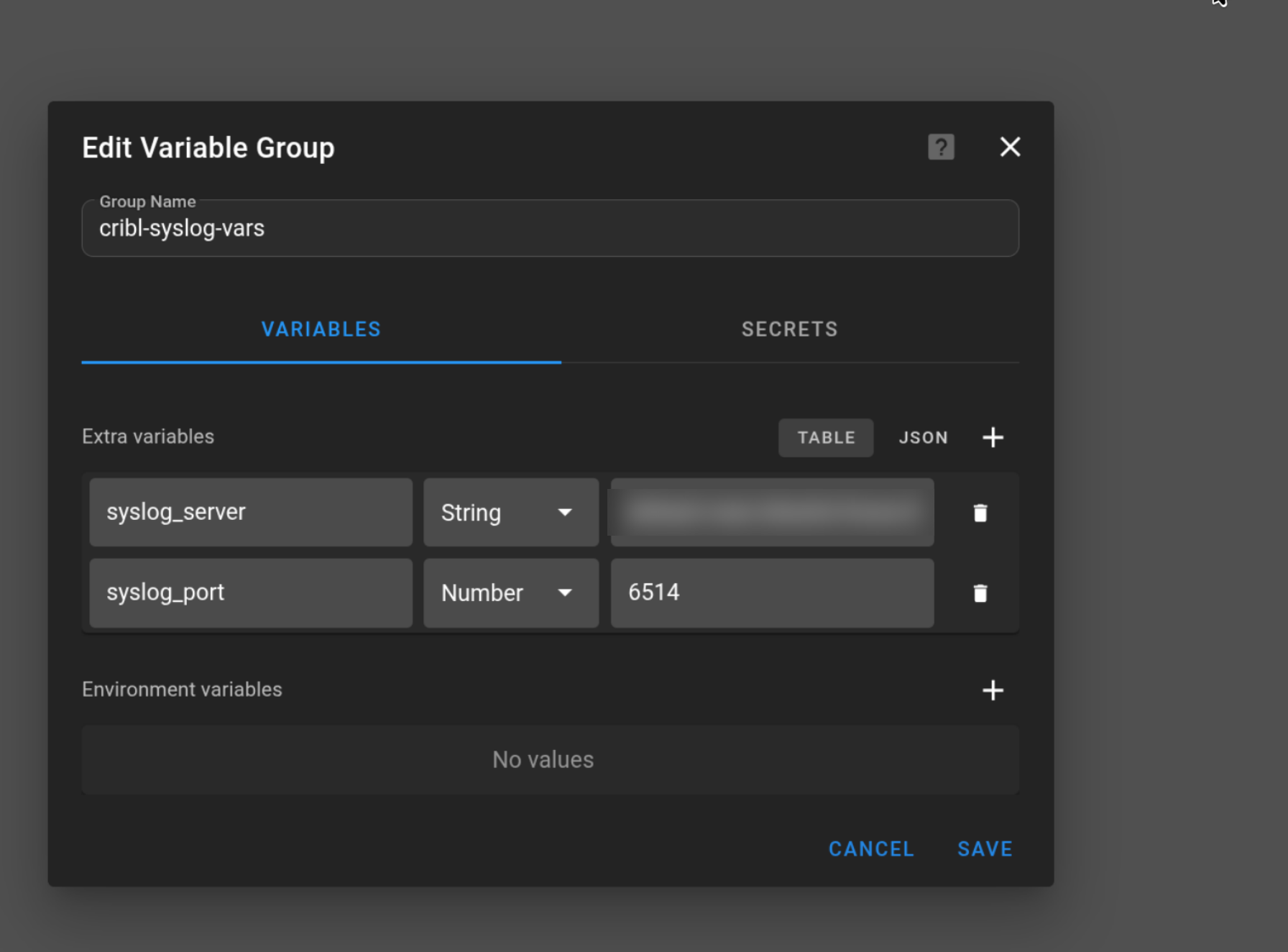
Variable Group cribl-syslog-vars – syslog_server and syslog_port as extra variables
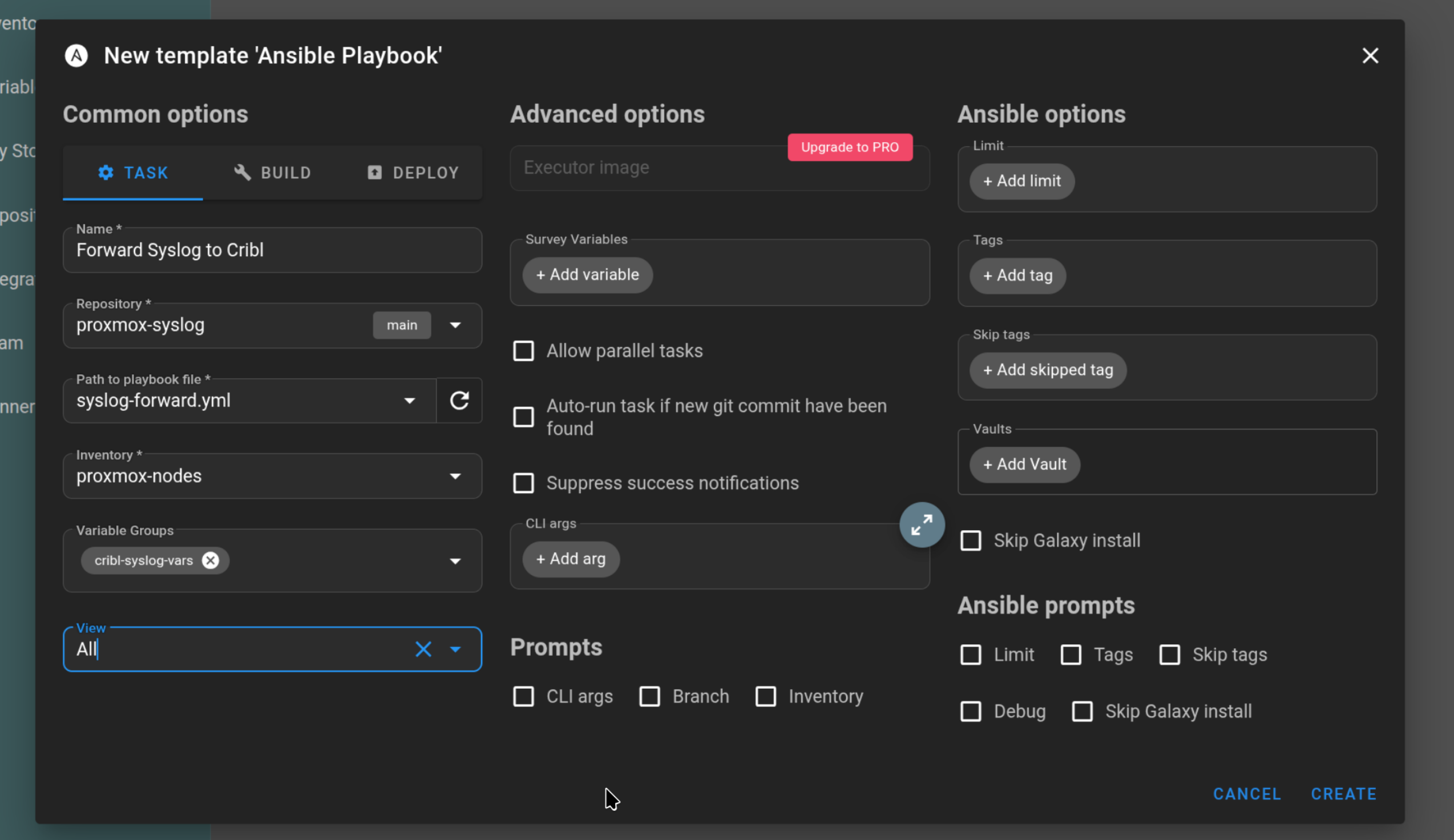
Task Template – ties the playbook, inventory, repo, and variable group together
Keeping the Cribl hostname and port in a Variable Group instead of the playbook meant later changes (see below) required editing one field, not touching any YAML.
05 – Debug three separate, stacked failures
The first run failed validation with rsyslogd: No such file or directory – rsyslogd itself wasn’t installed on Proxmox’s minimal Debian base, so I added an explicit rsyslog install task.
The second run failed with could not load module 'omfwd'. This turned out to be a red herring caused by a leftover module(load="omfwd") directive in the template – omfwd is a core module compiled directly into modern rsyslogd, not a loadable .so, so asking rsyslog to dynamically load it as a file broke things. Removing that line fixed it.
The third failure was a genuine missing package: could not load module 'lmnsd_gtls'. Unlike omfwd, the GnuTLS network stream driver really does ship separately, in rsyslog-gnutls. Adding that package to the install task resolved it, and the config passed validation cleanly across all three nodes.
06 – The pipeline “worked” but nothing arrived in Cribl
With a clean Ansible run, an open TCP connection (ss -tnp showing ESTAB to Cribl’s IP), and no errors in journalctl -u rsyslog, I figured everything was working – until I checked cribl.log and a live capture in Cribl and saw nothing arriving.
The port I’d picked, 6517 (chosen to avoid colliding with the Fortinet firewall’s existing use of the standard TLS syslog port, 6514), timed out at the TCP level entirely. The cause turned out to be specific to Cribl Cloud: its ingress only forwards a fixed, narrow band of custom TCP ports – in this case 20000-20010 – plus a short list of pre-configured ports for specific source types (514, 6514, 9997, and similar). Any other port, including one freely creatable inside the Cribl Stream UI itself, is simply never opened at the network edge. Self-hosted Cribl wouldn’t have this restriction; Cribl Cloud’s managed ingress does.
Switching the destination Source in Cribl to port 20000 – inside the allowed range – and updating the single syslog_port value in Semaphore’s Variable Group resolved it immediately. A test message sent via logger appeared in Cribl’s Live Data capture within seconds, parsed into structured fields.
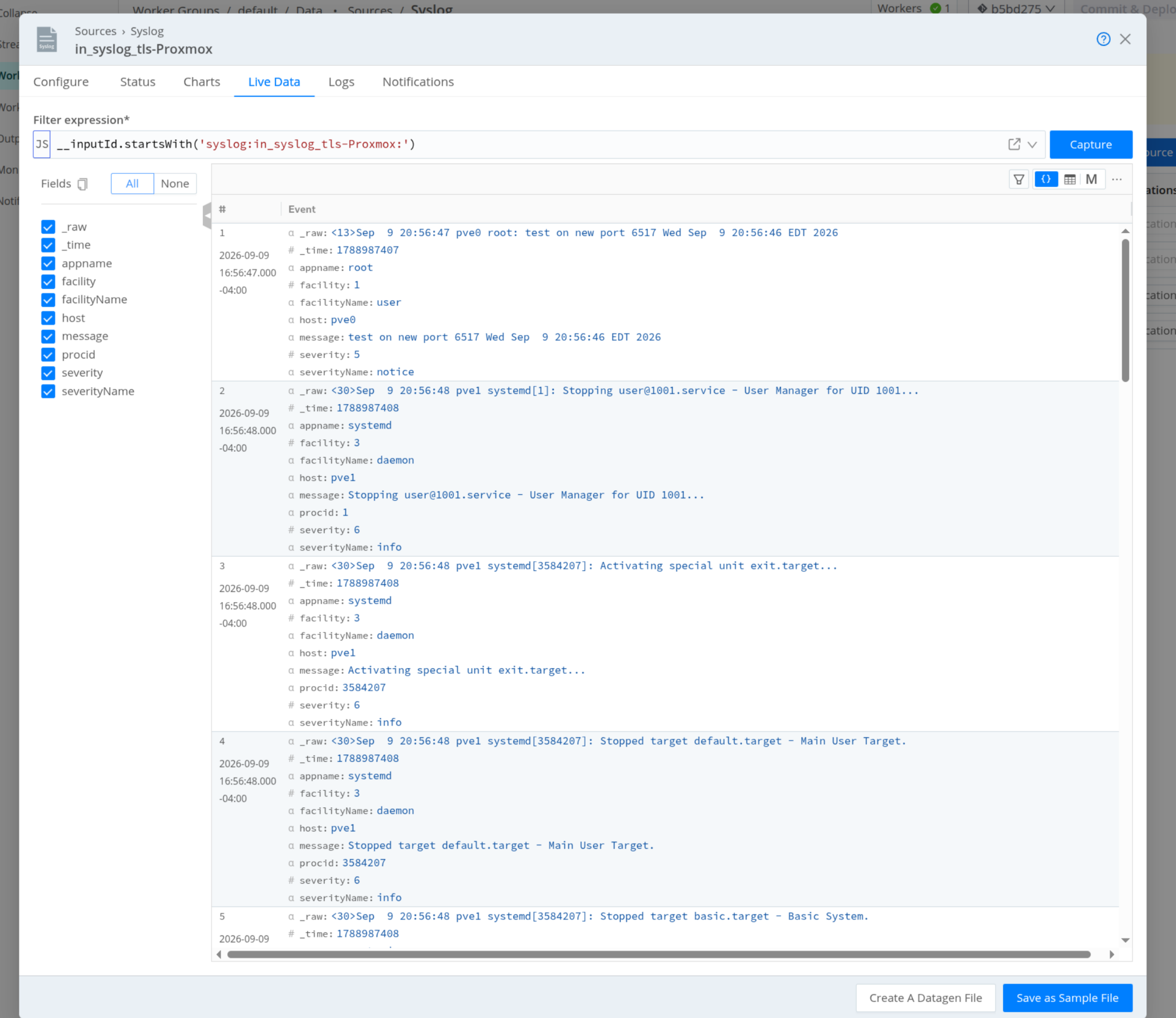
Cribl Live Data – parsed syslog events arriving from the Proxmox nodes
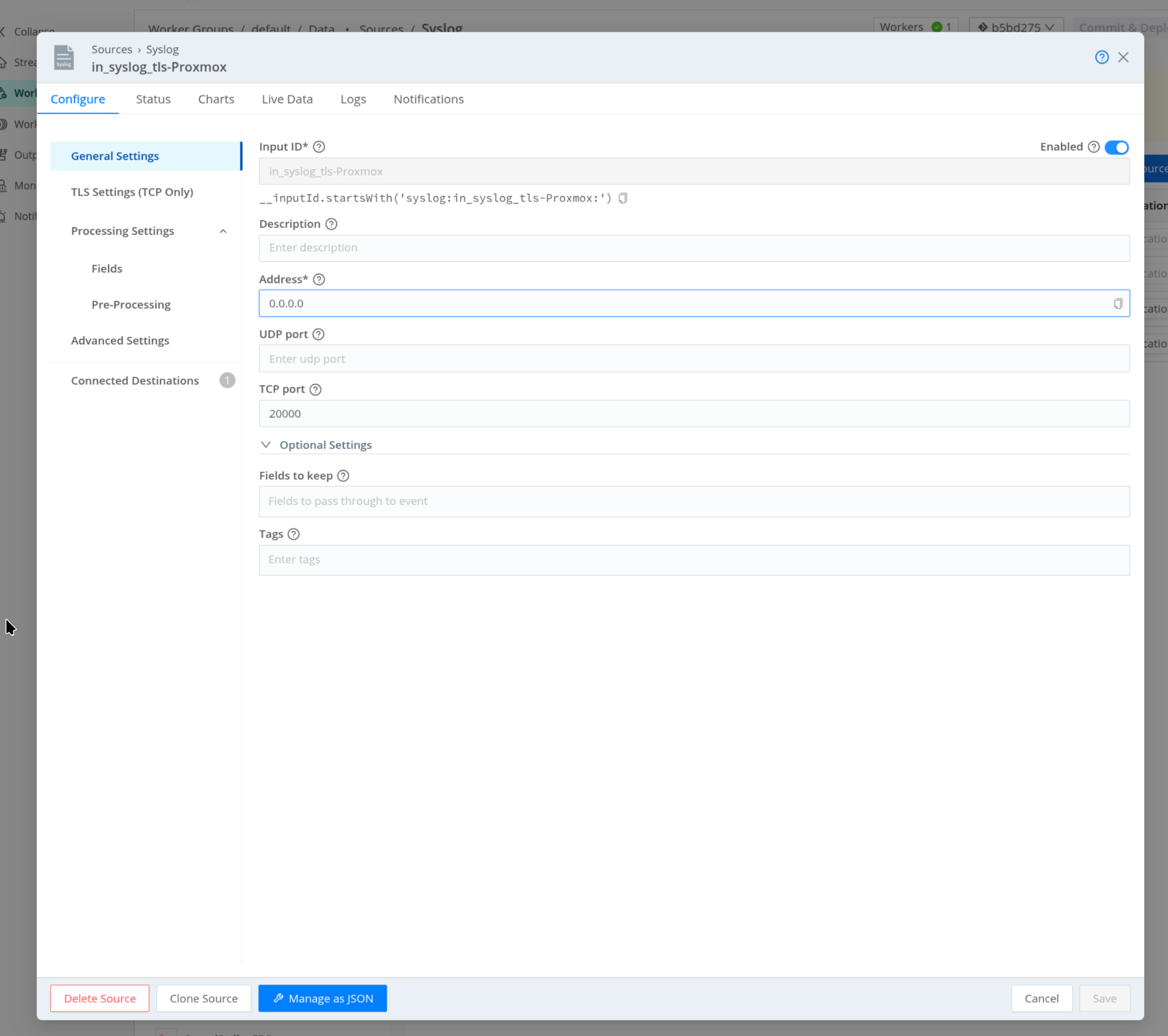
Cribl Syslog source – TCP port 20000, inside the allowed custom port range
Final rsyslog Action Config
global(
    DefaultNetstreamDriver="gtls"
    DefaultNetstreamDriverCAFile="/etc/ssl/certs/ca-certificates.crt"
)

action(
    type="omfwd"
    target="default.main.YOUR-CRIBL-ORG.cribl.cloud"
    port="20000"
    protocol="tcp"
    StreamDriver="gtls"
    StreamDriverMode="1"
    StreamDriverAuthMode="x509/name"
    action.resumeRetryCount="-1"
)
Note: Cribl Cloud only forwards traffic on a specific, narrow band of custom TCP ports (in this environment, 20000-20010) plus a short list of preconfigured ports tied to specific source types. Before picking a port for a new Syslog Source on Cribl Cloud, check your organization’s networking/ports page rather than assuming any port you configure in the Source UI will actually be reachable.
Why This Approach Works Well
Keeping the destination hostname and port as Semaphore extra variables – rather than hardcoded in the playbook – meant the mid-project port change (6514 to 6517, then finally to 20000) required editing a single field in Semaphore’s UI and re-running the existing template, with zero changes to the Git repo or the Ansible code itself. Combined with a dedicated non-root service account and a rsyslogd -N1 validation gate before any restart, the whole rollout stayed both safe to re-run and easy to adjust without redeploying anything by hand across three separate nodes.
Outcomes
| Transport | Syslog over TLS |
| Automation | Ansible playbook, orchestrated via self-hosted Semaphore UI |
| Access model | Dedicated non-root ansible account, key-based auth, scoped passwordless sudo |
| Config source of truth | Private GitHub repo, pulled by Semaphore on each run |
| Key pitfall | Cribl Cloud’s ingress only opens a fixed custom-port range (20000-20010) plus preconfigured ports – arbitrary ports configured in the Source UI are never actually reachable |
| Network requirement | Outbound TCP only from each Proxmox node – no inbound access required |