MetaCTF - Hexed
A PNG file “cursed” into an xxd hex dump. Recognizing the format and reversing it with Python or CyberChef recovered the original image and the flag.
Challenge
Platform: MetaCTF Category: Forensics
Oh no! Our picture of a flag has been cursed! Can you undo the curse and recover the cursed flag image?
Reconnaissance
Downloading the file and running file on it:
1file hexed.png
2# hexed.png: ASCII text
A PNG that file identifies as ASCII text — the “curse” is immediately clear. The binary image data has been converted into a human-readable text format rather than stored as raw bytes.
Opening it confirms it’s in xxd hex dump format:
00000000: 8950 4e47 0d0a 1a0a 0000 000d 4948 4452  .PNG........IHDR
00000010: 0000 0263 0000 00f8 0806 0000 00a0 f6e1  ...c............
Each line contains:
- A byte offset (e.g.
00000000) - 16 bytes of hex data in groups of two (e.g.
8950 4e47) - An ASCII preview of those bytes on the right (e.g.
.PNG........IHDR)
The PNG magic bytes 89 50 4E 47 0D 0A 1A 0A are right there in the first line — this is definitely a valid PNG that’s been xxd-dumped to text.
Exploitation
The fix is to reverse the xxd hex dump back to binary. The key parsing challenge: each line has three sections separated by specific delimiters, and only the middle hex section is needed — the offset column and ASCII preview column must be stripped.
Python approach
 1with open('hexed.png', 'r') as f:
 2    lines = f.readlines()
 3
 4binary_data = bytearray()
 5for line in lines:
 6    line = line.rstrip('\n')
 7    if not line:
 8        continue
 9    # Split on ': ' to skip the offset
10    colon_idx = line.find(': ')
11    if colon_idx == -1:
12        continue
13    rest = line[colon_idx+2:]
14    # The hex dump is separated from ASCII by two spaces
15    double_space = rest.find('  ')
16    hex_part = rest[:double_space] if double_space != -1 else rest
17    hex_clean = hex_part.replace(' ', '')
18    if hex_clean:
19        binary_data.extend(bytes.fromhex(hex_clean))
20
21with open('uncursed.png', 'wb') as f:
22    f.write(binary_data)
Verifying the output:
1file uncursed.png
2# uncursed.png: PNG image data, 611 x 248, 8-bit/color RGBA, non-interlaced
CyberChef approach
Even simpler — CyberChef has a dedicated “From Hex Dump” operation that handles the xxd format natively:
- Search for “From Hex Dump” and drag it into the Recipe
- Paste the full contents of
hexed.pnginto the Input box - Click the download icon next to the Output to save as
.png
One operation, done.
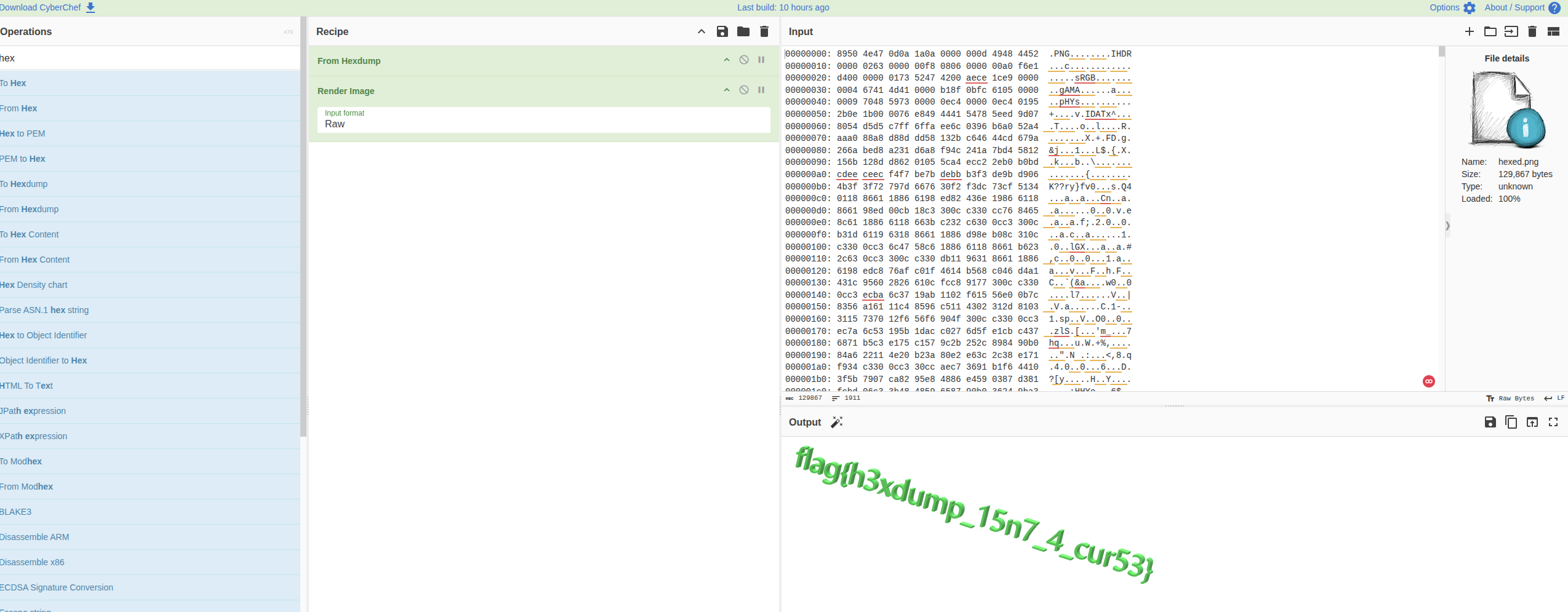
CyberChef From Hexdump — one operation converts the text dump back to a valid PNG
Flag
flag{h3xdump_15n7_4_cur53}
Takeaways
fileis always step one — it immediately told us the PNG wasn’t binary, which pointed directly at the encoding.- Recognizing common encoding formats is a core forensics skill.
xxdoutput has a very distinctive layout (offset : hex groups ASCII preview) that’s worth memorising. - CyberChef for encoding/decoding, scripting for custom logic — “From Hex Dump” handled this perfectly in one step. For something with a rolling XOR or custom transform, you’d reach for Python instead.
- The
xxdtool on Linux/Mac can both dump and reverse:xxd -r hexdump.txt original.bin. Knowing the standard tooling means you sometimes don’t need to write any code at all.